> For the complete documentation index, see [llms.txt](https://gitbook.wenzhihuai.com/llms.txt). Markdown versions of documentation pages are available by appending `.md` to page URLs; this page is available as [Markdown](https://gitbook.wenzhihuai.com/ge-ren-wang-zhan/3.-ding-shi-ren-wu.md).
# 3.3 定时任务.md
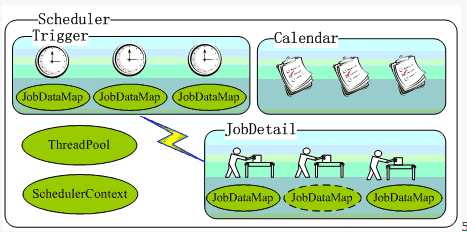
先看一下Quartz的架构图:
### 一.特点:
1. 强大的调度功能,例如支持丰富多样的调度方法,可以满足各种常规及特殊需求;
2. 灵活的应用方式,例如支持任务和调度的多种组合方式,支持调度数据的多种存储方式;
3. 分布式和集群能力。
### 二.主要组成部分
1. JobDetail:需实现该接口定义的人物,其中JobExecutionContext提供了上下文的各种信息。
2. JobDetail:QUartz的执行任务的类,通过newInstance的反射机制实例化Job。
3. Trigger: Job的时间触发规则。主要有SimpleTriggerImpl和CronTriggerImpl两个实现类。
4. Calendar:org.quartz.Calendar和java.util.Calendar不同,它是一些日历特定时间点的集合(可以简单地将org.quartz.Calendar看作java.util.Calendar的集合——java.util.Calendar代表一个日历时间点,无特殊说明后面的Calendar即指org.quartz.Calendar)。
5. Scheduler:由上图可以看出,Scheduler是Quartz独立运行的容器。其中,Trigger和JobDetail可以注册到Scheduler中。
6. ThreadPool:Scheduler使用一个线程池作为任务运行的基础设施,任务通过共享线程池中的线程提高运行效率。
### 三、Quartz设计
1. properties file\
[官网](http://www.quartz-scheduler.org/documentation/quartz-2.2.x/quick-start.html)中表明:quartz中使用了quartz.properties来对quartz进行配置,并保留在其jar包中,如果没有定义则默认使用改文件。
2.
### 四、使用
1. hello world!代码[在这](/ge-ren-wang-zhan/3.-ding-shi-ren-wu.md)
2. 本网站中使用quartz来对数据库进行备份,与Spring结合 (1)导入spring的拓展包,其协助spring集成第三方库:邮件服务、定时任务、缓存等。。。
```html
org.springframework
spring-context-support
4.2.6.RELEASE
```
(2)导入quartz包
```html
org.quartz-scheduler
quartz
2.3.0
```
(3)mysql远程备份 使用命令行工具仅仅需要一行:
```html
mysqldump -u [username] -p[password] -h [hostip] database > file
```
但是java不能直接执行linux的命令,仍旧需要依赖第三方库ganymed
```html
ch.ethz.ganymed
ganymed-ssh2
262
```
完整代码如下:
```java
@Component("mysqlService")//在spring中注册一个mysqlService的Bean
public class MysqlUtil {
...
StringBuffer sb = new StringBuffer();
sb.append("mysqldump -u " + username + " -p" + password + " -h " + host + " " +
database + " >" + file);
String sql = sb.toString();
Connection connection = new Connection(s_host);
connection.connect();
boolean isAuth = connection.authenticateWithPassword(s_username, s_password);//进行远程服务器登陆认证
if (!isAuth) {
logger.error("server login error");
}
Session session = connection.openSession();
session.execCommand(sql);//执行linux语句
InputStream stdout = new StreamGobbler(session.getStdout());
BufferedReader br = new BufferedReader(new InputStreamReader(stdout));
...
}
```
(4)spring中配置quartz
```xml
```
(5)java完整文件[在这](https://github.com/Zephery/newblog/blob/master/src/main/java/com/myblog/util/MysqlUtil.java)
## Spring的高级特性之定时任务
java ee项目的定时任务中除了运行quartz之外,spring3+还提供了task,可以看做是一个轻量级的Quartz,而且使用起来比Quartz简单的多。
(1)spring配置文件中配置:
```html
```
(2)最简单的例子,在所需要的函数上添加定时任务即可运行
```java
@Scheduled(fixedRate = 5000)
public void reportCurrentTime() {
System.out.println("每隔5秒运行一次" + sdf.format(new Date()));
}
```
(3)运行的时候会报错:
```html
org.springframework.beans.factory.NoSuchBeanDefinitionException: No qualifying bean of type [org.springframework.scheduling.TaskScheduler] is defined
at org.springframework.beans.factory.support.DefaultListableBeanFactory.getBean(DefaultListableBeanFactory.java:372)
at org.springframework.beans.factory.support.DefaultListableBeanFactory.getBean(DefaultListableBeanFactory.java:332)
at org.springframework.scheduling.annotation.ScheduledAnnotationBeanPostProcessor.finishRegistration(ScheduledAnnotationBeanPostProcessor.java:192)
at org.springframework.scheduling.annotation.ScheduledAnnotationBeanPostProcessor.onApplicationEvent(ScheduledAnnotationBeanPostProcessor.java:171)
at org.springframework.scheduling.annotation.ScheduledAnnotationBeanPostProcessor.onApplicationEvent(ScheduledAnnotationBeanPostProcessor.java:86)
at org.springframework.context.event.SimpleApplicationEventMulticaster.invokeListener(SimpleApplicationEventMulticaster.java:163)
at org.springframework.context.event.SimpleApplicationEventMulticaster.multicastEvent(SimpleApplicationEventMulticaster.java:136)
at org.springframework.context.support.AbstractApplicationContext.publishEvent(AbstractApplicationContext.java:380)
```
参考:\
1.\
2.\
Spring的定时任务调度器会尝试获取一个注册过的 task scheduler来做任务调度,它会尝试通过BeanFactory.getBean的方法来获取一个注册过的scheduler bean,获取的步骤如下:
1.尝试从配置中找到一个TaskScheduler Bean
2.寻找ScheduledExecutorService Bean
3.使用默认的scheduler 修改log4j.properties即可: log4j.logger.org.springframework.scheduling=INFO\
其实这个功能不影响定时器的功能。 (4)结果:
```html
每隔5秒运行一次14:44:34
每隔5秒运行一次14:44:39
每隔5秒运行一次14:44:44
```